
When I first started learning DevOps, I thought the biggest challenge would be learning the tools. There were so many technologies to understand, including Linux, Git, Docker, Kubernetes, Jenkins, Terraform, AWS, monitoring, networking, CI/CD, and security, that it was difficult to know where to begin or what I actually needed to learn to become job-ready.
The problem was not a lack of resources. There were already thousands of tutorials, courses, documentation pages, YouTube videos, labs, and certification programs available. The real problem was understanding how these technologies fit together and how to turn individual tool knowledge into practical engineering skills.
You can spend weeks learning Docker without understanding how containers fit into a real deployment process. You can learn Kubernetes commands without understanding why an organization would use Kubernetes in the first place. You can complete an AWS course and still struggle when someone asks you to deploy an application, troubleshoot a production issue, automate infrastructure, or explain how traffic moves through the system.
If I were starting DevOps again, I would approach the learning process very differently. Instead, I would build the fundamentals first and introduce each technology when it solves a specific problem. I would also spend significantly more time building projects, breaking them, troubleshooting them, and rebuilding them rather than simply watching tutorials.
The objective would not be to become someone who knows commands for dozens of DevOps tools. The objective would be to become someone who can take an application from source code to a reliable deployment, automate the process, manage the infrastructure, monitor the system, troubleshoot failures, and explain the decisions behind the architecture.
That is the road-map I wish I had when I started.
Start by Understanding What DevOps Actually Means
Before learning specific tools, it is important to understand the problem DevOps is designed to solve. DevOps is not simply AWS, Docker, Kubernetes, Jenkins, or Terraform. These are technologies that can be used to implement different parts of a broader engineering and operational workflow.
At a practical level, DevOps is concerned with improving how software is developed, tested, released, deployed, operated, monitored, and improved. It involves automation, infrastructure management, collaboration between development and operations, reliable software delivery, observability, security, and continuous improvement.
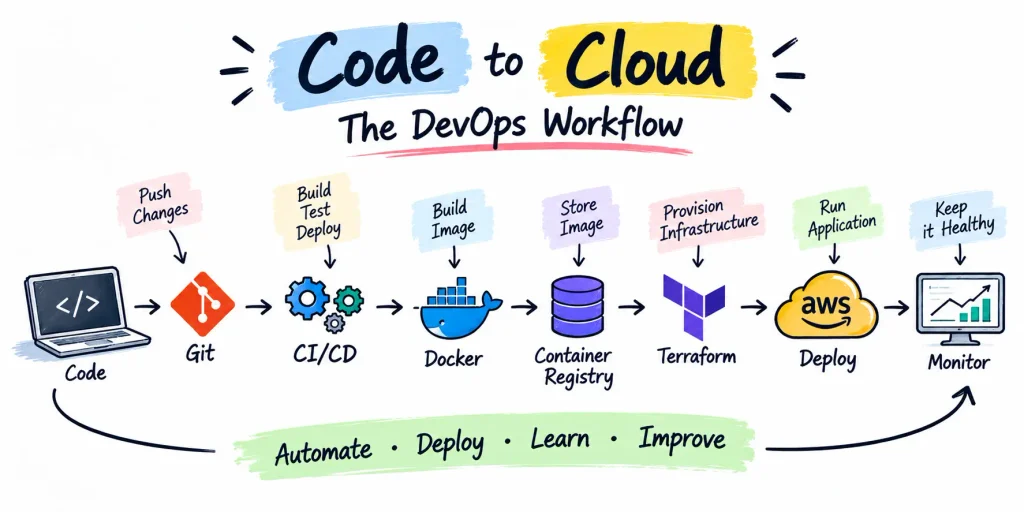
Consider a typical application delivery process. A developer makes a change and pushes the code to Git. That change can trigger a CI pipeline that runs tests, builds the application, packages it into an artifact or container image, and pushes that image to a registry. A deployment process can then release the new version to a cloud environment. Infrastructure can be managed through code using Terraform, while monitoring and logging provide visibility into the application after deployment.
When you understand this complete workflow, the individual technologies become much easier to learn because you understand why they exist and what problem they are solving.
That is why I would avoid starting with a tool such as Kubernetes simply because it appears frequently in DevOps job descriptions. Start with the engineering problems first, and then learn the tools that help you solve those problems.
Build a Strong Linux Foundation
Linux should be one of the first serious skills you develop because it appears throughout modern infrastructure environments. Cloud servers, containers, CI runners, Kubernetes nodes, and many production workloads rely heavily on Linux.
You do not need to become a Linux kernel expert, but you should become comfortable operating a Linux system from the command line. You should understand how the file-system works, how users and groups are managed, how permissions work, how processes are created and controlled, how services run, how packages are installed, how logs are inspected, and how basic networking problems are investigated.
You should also become comfortable with SSH because remote server access is a fundamental part of infrastructure work. Understanding environment variables, file ownership, process management, system services, disk usage, memory usage, and basic security controls will give you a foundation that continues to be useful throughout your DevOps career.
The most important part of learning Linux is to avoid treating commands as vocabulary that needs to be memorized. Instead, use Linux to solve actual problems. Create a server, connect to it over SSH, install an application, run that application as a service, inspect its logs, investigate its resource usage, and troubleshoot it when it stops working.
A useful first project is to deploy a simple web application on a Linux server. Configure SSH access, create a non-root user, configure permissions, install the required software, configure basic firewall rules, run the application as a service, and learn how to inspect its logs.
Then intentionally break something and troubleshoot it. The troubleshooting experience is important because DevOps work is not limited to deploying systems successfully. You will also need to understand why a system stopped working and determine the safest way to restore it.
Learn Networking Before Going Deep Into the Cloud
Networking is another fundamental area that becomes increasingly important as you move into cloud infrastructure, containers, Kubernetes, and distributed systems.
You should understand concepts such as IP addresses, subnets, routing, ports, DNS, TCP, HTTP, HTTPS, NAT, firewalls, and load balancing. You do not need to become a network engineer, but you should be able to reason about how traffic moves between different components of an application.
For example, if an application is running correctly on a server but users cannot access it, you should have a methodical way of investigating the problem. You should be able to determine whether the issue is related to the application, the listening port, the firewall, the network route, DNS, the load balancer, or another component.
A useful networking lab is to run two Linux machines or virtual machines and configure an application that communicates between them. Experiment with ports, firewall rules, DNS resolution, HTTP requests, and connectivity testing. Tools such as curl, ping, ss, dig, and traceroute can help you understand what is happening at different layers.
The goal is not to memorize networking commands. The goal is to develop the ability to trace a connectivity problem from the user-facing symptom back to the underlying infrastructure.
Make Git Part of Your Daily Workflow
Git is not optional for a DevOps engineer because infrastructure and operational configuration should be treated as code whenever possible.
You should understand repositories, commits, branches, merges, pull requests, tags, remotes, and the basic concepts behind rebasing and version history. More importantly, you should understand how Git fits into an engineering workflow.
Infrastructure definitions, Terraform configurations, Dockerfiles, Kubernetes manifests, CI/CD pipelines, monitoring configurations, scripts, and application source code can all live in version-controlled repositories. This makes changes reviewable, traceable, and reproducible.
Your GitHub profile can also become an important part of your portfolio, but the objective should not be to create dozens of small repositories simply to demonstrate that you completed tutorials. A smaller number of well-documented projects can communicate much more about your abilities.
For each meaningful project, explain what you built, why you built it, how the architecture works, how the application is deployed, how the infrastructure is managed, and what problems you encountered while building it. This gives potential employers evidence of engineering ability rather than simply evidence that you have followed tutorials.
Learn Bash and Basic Automation
Once you are comfortable with Linux, start automating repetitive tasks. Bash is a useful starting point because it teaches you how Linux commands can be combined to create practical automation workflows.
You should understand variables, arguments, conditions, loops, functions, pipes, redirection, exit codes, and basic error handling. You can use these concepts to create scripts for tasks such as checking disk usage, monitoring processes, collecting system information, checking whether services are running, creating backups, or managing logs.
The objective is not to become a Bash specialist. The objective is to develop an automation mindset.
When you repeatedly perform the same sequence of commands, you should begin asking whether that workflow can be automated. That habit becomes increasingly valuable as your infrastructure grows because manual processes become slower, less consistent, and more difficult to maintain.
Move Into Cloud Fundamentals
Once you have a reasonable foundation in Linux, networking, Git, and basic scripting, move into cloud infrastructure. AWS is a useful environment for learning because it exposes you to many of the infrastructure concepts used in modern application architectures.
You do not need to memorize every AWS service. Start by understanding the major categories of infrastructure, including compute, networking, storage, identity and access management, databases, load balancing, DNS, and monitoring.
For example, you should understand what an EC2 instance provides, how a VPC is structured, how subnets and route tables influence traffic, how security groups control network access, how IAM controls permissions, how S3 provides object storage, how load balancers distribute requests, and how RDS provides managed databases.
More importantly, learn how these services work together. Instead of learning EC2 as an isolated AWS service, understand how a user request reaches an application running on EC2. Instead of memorizing the components of a VPC, create one and observe how traffic moves through it. Instead of learning IAM policy syntax without context, create roles and permissions and see what happens when access is granted or denied.
That is how cloud knowledge becomes practical infrastructure knowledge.
Build Your First Real Cloud Project
After learning the fundamentals, build a small application architecture on AWS. The application itself does not need to be complicated because the purpose of the project is to learn infrastructure rather than application development.
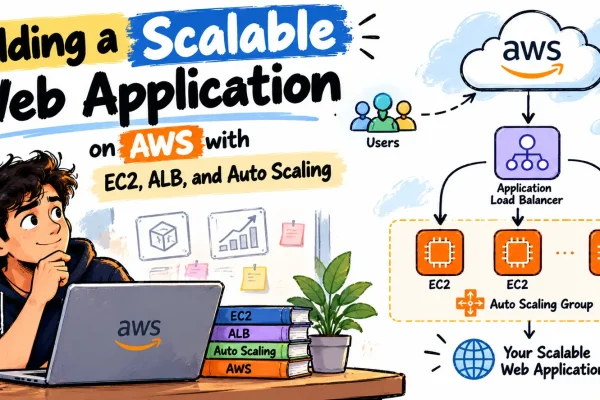
A useful architecture can include an application running on EC2, a VPC with public and private networking, security groups, an application load balancer, an RDS database, S3 for object storage, CloudWatch for monitoring, and IAM roles for access control.
As you build the project, focus on understanding the request path and the relationship between the components. You should be able to explain how traffic enters the system, how it reaches the application, how the application communicates with the database, which resources should be publicly accessible, how access is controlled, and what you would investigate if the application became unavailable.
You should also practice deleting and rebuilding parts of the environment. The more familiar you become with creating infrastructure deliberately rather than simply clicking through a console, the easier it becomes to manage infrastructure consistently.
Learn Docker by Solving a Deployment Problem
Docker becomes much easier to understand after you have experienced the problems associated with manually configuring applications on servers.
When an application is deployed manually, you may need to install a specific runtime, install dependencies, configure environment variables, copy application files, configure services, and make sure the production environment behaves consistently with development.
Containers provide a standardized way of packaging an application and its dependencies. This makes Docker particularly useful as a bridge between application development and deployment.
Start by learning images, containers, Dockerfiles, registries, volumes, networks, environment variables, and container lifecycle management. Once you understand the fundamentals, move to Docker Compose so that you can run applications that depend on multiple containers.
For a practical Docker project, take the application from your Linux deployment and containerize it. Create a Dockerfile, build the image, run the container, expose the application, configure environment variables, and push the image to a container registry.
Then create a multi-container environment in which your application communicates with a database or another service. This will help you understand container networking and the difference between packaging an application and actually operating a multi-service system.
Learn CI/CD Through a Real Deployment Pipeline
CI/CD is where the different parts of the DevOps workflow begin to come together.
Instead of starting with a Jenkins tutorial, first understand what the pipeline is supposed to accomplish. A developer should be able to make a change, push it to a Git repository, and have an automated process validate the change, run tests, build the application, package it, and potentially deploy it.
You can implement this workflow using GitHub Actions, GitLab CI, Jenkins, or another CI/CD platform. The specific tool is less important at the beginning than understanding the workflow and the reasons for each stage.
A practical pipeline can perform the following operations:
- Check out the application source code from Git.
- Install the required dependencies.
- Run automated tests and fail the pipeline when those tests fail.
- Build the application or create its production artifact.
- Build a Docker image when the application is containerized.
- Push the image to a container registry.
- Deploy the new version to the target environment.
- Perform a basic post-deployment health check.
Start with a simple pipeline and improve it over time. Add better testing, environment separation, deployment approvals, rollback strategies, security checks, and monitoring as your understanding grows.
The important principle is that deployment should become repeatable. If a deployment depends on an engineer remembering a long sequence of manual commands, the process is difficult to reproduce and difficult to trust.
Learn Infrastructure as Code With Terraform
Once you understand how to create cloud infrastructure manually, learn Infrastructure as Code.
Terraform is a useful tool for developing this skill because it allows you to describe infrastructure declaratively and manage it through version-controlled configuration.
The important concept is not Terraform syntax itself. The important concept is that infrastructure becomes reproducible, reviewable, and manageable through code.
Instead of manually creating a network, subnets, security groups, servers, and other resources through a cloud console, you define the desired infrastructure in configuration files. Terraform can then create and manage that environment based on the declared configuration.
Start with a small project and gradually increase its complexity. You might begin by creating a VPC, subnets, security groups, and an EC2 instance. Once you understand the basics, extend the project to include the infrastructure required by your application.
One particularly useful exercise is to destroy the environment and recreate it using the Terraform configuration. This teaches you an important Infrastructure as Code principle: your environment should not depend on someone’s memory of how it was manually configured months ago.
Understand Configuration and Secret Management
As your infrastructure becomes more complex, you will need to understand how configuration and secrets should be managed.
Application configuration and sensitive credentials are not the same thing. Database passwords, API keys, access tokens, and private credentials should not be hard-coded into application source code or committed directly to a Git repository.
Learn how environment variables, cloud secret-management services, IAM roles, and other mechanisms can be used to separate sensitive information from application code.
You should also understand why configuration needs to be consistent across development, testing, staging, and production environments. Configuration management becomes increasingly important as the number of servers, containers, services, and environments increases.
Tools such as Ansible can be explored after you have a solid Linux and infrastructure foundation. At that point, configuration management becomes easier to understand because you already know the manual operations that you are trying to automate.
Learn Kubernetes After You Understand Containers
Kubernetes is one of the most visible technologies in modern DevOps, but it is also one of the easiest technologies to learn too early.
If you start Kubernetes before understanding Linux, networking, containers, deployments, services, load balancing, and infrastructure, you can end up memorizing Kubernetes objects without understanding the problems they solve.
Learn Kubernetes after you are comfortable with Docker and basic cloud infrastructure. Start with pods, deployments, services, namespaces, ConfigMaps, Secrets, volumes, health probes, resource requests and limits, ingress, and basic scheduling concepts.
Then focus on understanding how Kubernetes manages application workloads. Learn what happens when a pod fails, how deployments manage replicas, how services provide stable access to workloads, how health checks influence traffic, and how resource limits affect scheduling and runtime behavior.
A useful project is to deploy your containerized application to a local Kubernetes environment such as Minikube or Kind. Create a deployment, expose it through a service, configure environment variables and secrets, add health checks, define resource limits, and update the application.
Then deliberately break the deployment and troubleshoot it. Inspect pod status, logs, events, configuration, networking, and resource usage. Once you are comfortable with the fundamentals locally, you can move toward a managed Kubernetes environment such as Amazon EKS.
The objective is not to be able to say that you know Kubernetes. The objective is to understand what Kubernetes is doing and to be able to investigate a workload when something goes wrong.
Learn Monitoring, Logging, and Observability
Successfully deploying an application does not mean that the application is production-ready. You also need to understand what is happening after deployment.
Start by understanding the difference between metrics, logs, and traces. Metrics provide numerical information about system behavior, such as CPU utilization, memory consumption, request rate, latency, and error rate. Logs provide detailed records of application and system events. Traces help you understand how individual requests move through different components of a distributed system.
If you are working with AWS, CloudWatch is a natural starting point. You can then explore technologies such as Prometheus and Grafana as your understanding grows.
Build dashboards that allow you to understand the health of your application. Configure alerts around meaningful signals instead of creating alerts for every available metric.
For example, high CPU utilization may not always mean that users are experiencing problems, while an increase in application latency or error rate could be a much more direct indication of user impact. Understanding this difference is important because effective monitoring should help engineers identify real problems rather than simply generate noise.
This is also where DevOps begins to overlap with reliability engineering. Operating a system requires more than deploying it; you need the visibility necessary to understand its behavior and respond when it deviates from expectations.
Treat Security as Part of the DevOps Process
Security should not be a final topic that you study after everything else. It should become part of the way you build your projects from the beginning.
Develop the habit of using least-privilege permissions, protecting credentials, restricting unnecessary network exposure, keeping systems updated, managing secrets correctly, using HTTPS, and understanding basic authentication and authorization concepts.
As you become more comfortable with containers, you can also explore container image scanning and dependency security. As you work with cloud infrastructure, pay attention to IAM permissions, security groups, public resources, storage permissions, and network boundaries.
You do not need to become a security specialist to become a strong DevOps engineer. You do need to understand that infrastructure decisions can introduce security risks and that secure configuration should be part of normal engineering practice.
Build Projects That Increase in Difficulty
The biggest mistake I would avoid is creating separate projects that demonstrate individual tools without demonstrating how those tools work together.
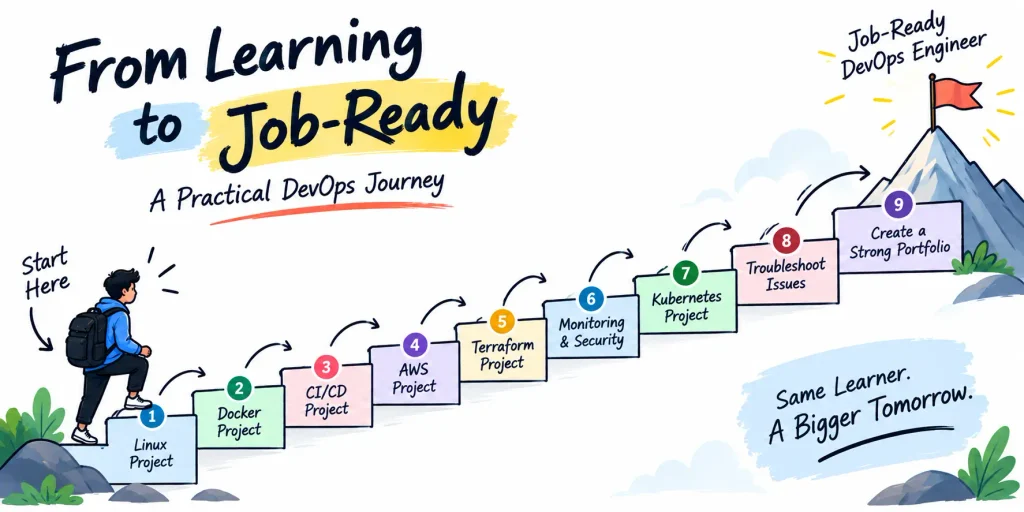
A better approach is to build projects that progressively increase in complexity. Start with a simple application running on a Linux server. Once you understand that deployment, containerize the application with Docker. Then automate its testing and deployment with CI/CD. After that, provision the infrastructure using Terraform and deploy the application to AWS. Add monitoring, logging, security, and secrets management. Finally, introduce Kubernetes or a more advanced architecture when you have a reason to use it.
This progression creates a continuous learning path in which every project builds on the previous one.
A practical project sequence could look like this:
- Deploy a simple application manually on a Linux server and learn how to operate and troubleshoot it.
- Containerize the application with Docker and understand image creation, container execution, networking, and configuration.
- Create a CI/CD pipeline that automatically tests, builds, packages, and deploys the application.
- Deploy the application to AWS and build the supporting infrastructure around it.
- Recreate the AWS environment using Terraform so that the infrastructure becomes reproducible.
- Add monitoring, logging, alerts, secret management, and basic security controls.
- Deploy the containerized application to Kubernetes and learn how orchestration changes the deployment and operational model.
By the end of this progression, you are no longer demonstrating isolated knowledge of individual tools. You are demonstrating an understanding of the complete software delivery and infrastructure lifecycle.
Use Free Resources Strategically
You do not need to buy an expensive course for every technology in the DevOps ecosystem.
Official documentation should become one of your primary learning resources. AWS, Docker, Kubernetes, Terraform, GitHub, Linux distributions, and many other major technologies provide extensive documentation and examples.
Free labs and interactive environments can also be valuable because they allow you to practice concepts instead of only reading about them. When you use cloud infrastructure for learning, however, always pay attention to pricing and resource usage. A service being available under a free tier does not necessarily mean that every configuration or usage pattern will remain free.
Develop the habit of checking what resources you have created and deleting infrastructure that you no longer need. Learning how to control cloud costs is itself a useful DevOps skill, particularly because real-world infrastructure decisions have financial consequences.
Learn to Troubleshoot Instead of Only Following Tutorials
One of the biggest differences between learning DevOps and becoming a DevOps engineer is the ability to troubleshoot.
When you build your projects, intentionally introduce failures. Stop services, break configuration files, block ports, change permissions, provide incorrect environment variables, create broken deployments, and cause CI pipelines to fail.
Then investigate each problem systematically.
Start with the symptom, collect evidence, identify which layer could be responsible, form a hypothesis, test that hypothesis, apply a fix, and verify that the system has actually recovered.
This approach is important because production failures rarely arrive as perfectly structured tutorial exercises. You may see a timeout without knowing whether the problem is DNS, networking, the application, the database, the load balancer, or an external dependency.
The more failures you troubleshoot during your learning process, the more comfortable you will become with the uncertainty that comes with operating real systems.
Build a Portfolio That Demonstrates Engineering Ability
Your GitHub profile should communicate how you think about infrastructure and software delivery rather than simply listing the tools you have used.
Instead of creating dozens of repositories with names such as docker-demo, terraform-demo, and kubernetes-demo, build a smaller number of meaningful projects that show progression.
For each serious project, document the architecture, deployment process, infrastructure, CI/CD workflow, monitoring approach, security considerations, and troubleshooting process. Include architecture diagrams where they help explain the system.
It is also useful to document problems you encountered. Explain what failed, how you identified the root cause, what you changed, and what you would improve if the application needed to handle significantly more traffic.
These details make a portfolio much stronger because they demonstrate engineering judgment rather than simply showing that you followed a tutorial.
How to Know When You Are Job-Ready
Being job-ready does not mean that you know every DevOps technology or that you can answer every possible interview question.
A more useful definition is that you can take a realistic application and understand how to deploy, automate, operate, monitor, secure, and troubleshoot it.
You should be comfortable working with Linux from the command line, using Git, understanding basic networking, writing simple automation scripts, deploying applications to cloud infrastructure, building Docker images, creating CI/CD pipelines, provisioning infrastructure with Terraform, and monitoring running systems.
You should also be able to explain your technical decisions.
If someone asks why you used a load balancer, you should be able to explain the problem it solves. If someone asks why you used Docker, you should be able to explain how containerization helps with application packaging and deployment consistency. If someone asks why Terraform is useful, you should be able to explain the benefits of Infrastructure as Code rather than simply describing Terraform commands.
If an application starts returning errors after deployment, you should have a systematic troubleshooting process instead of immediately restarting servers and hoping the problem disappears.
That ability to reason about systems is much more important than memorizing a long list of commands.
A Practical Learning Schedule
If you want to turn this road-map into a practical learning plan, avoid trying to study every topic simultaneously.
Spend your initial learning period building confidence with Linux, networking, Git, and Bash. Once those fundamentals are comfortable, move into AWS and build a small application environment. After that, introduce Docker and containerize the application you already built.
Once you understand containers, create a CI/CD pipeline and automate the deployment. Then move the infrastructure into Terraform so that the environment can be created through code.
After you have a working deployment pipeline, add monitoring, logging, security, and secret management. Only then move into Kubernetes and more advanced cloud-native architecture.
The exact amount of time required for each stage will vary depending on your existing experience and the amount of time you can dedicate to practice. The important thing is the order of concepts and the fact that every stage should involve building something rather than only consuming educational content.
What I Would Do If I Were Starting Today
If I were starting DevOps from zero today, I would begin with Linux and networking because those skills provide the foundation for almost everything that follows. I would learn Git and Bash alongside them so that version control and basic automation become part of my daily workflow.
I would then build a small application and deploy it manually to a cloud server. I would deliberately experience the manual process before trying to automate it because understanding the problem makes the automation much easier to appreciate.
After that, I would containerize the application with Docker and create a CI/CD pipeline that automatically tests, builds, and deploys it. I would then recreate the infrastructure using Terraform so that the environment could be provisioned repeatedly without relying on manual configuration.
Once that system worked, I would add monitoring, logging, alerting, security controls, and proper secret management. After gaining confidence with those fundamentals, I would move into Kubernetes and more advanced architectures.
Throughout the process, I would keep the projects in GitHub, document the architecture, write down the problems I encountered, and intentionally break things so that troubleshooting became part of the learning process.
That approach would give me something much more valuable than a long list of completed courses. It would give me evidence that I can actually build and operate systems.
The Roadmap Is Not About Collecting Tools
The biggest lesson I wish I had understood earlier is that DevOps is not a checklist of technologies.
Learning Linux does not automatically make you a DevOps engineer. Learning AWS does not automatically make you a DevOps engineer. Learning Kubernetes, Terraform, Docker, or Jenkins does not automatically make you a DevOps engineer either.
The valuable skill is being able to understand a system and improve the way it is built, deployed, operated, monitored, secured, and maintained.
The specific tools will change over time. The underlying engineering principles are much more durable.
That is why the best DevOps road-map is not necessarily the one that teaches you the largest number of technologies. It is the one that gradually teaches you how to solve increasingly difficult infrastructure and software delivery problems.
Start with fundamentals. Build something. Break it. Investigate the failure. Fix it. Automate the process. Monitor it. Rebuild it. Improve it.
That cycle will teach you far more than simply completing another tutorial.
The real milestone is not being able to say that you have learned Docker, Kubernetes, AWS, Terraform, Jenkins, and a dozen other tools. The real milestone is being given an application and being able to figure out how to deploy it reliably, automate the deployment, monitor the system, troubleshoot failures, and explain why you designed the architecture the way you did.
That is when you are moving from learning DevOps tools to becoming a DevOps engineer.
And that is the road-map I wish I had from the beginning.