
When Auto Scaling Makes Your AWS Application Crash
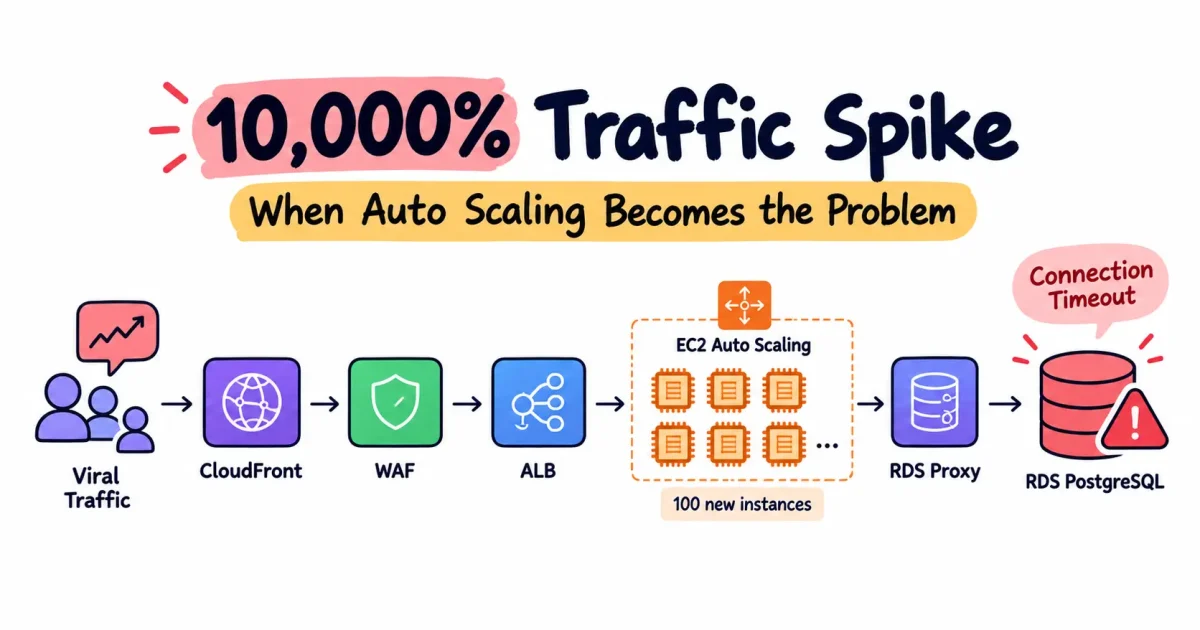
Picture a scenario where your application unexpectedly goes viral across social media. In just five minutes, traffic surges by 10,000%. Your Amazon EC2 Auto Scaling Group responds immediately by launching 100 new EC2 instances. The Application Load Balancer distributes incoming requests across the expanded fleet, every instance registers as healthy, and the infrastructure dashboards appear normal. From the perspective of your compute layer, everything seems to be working exactly as designed.
Yet users suddenly start receiving Connection Timeout errors. Your EC2 instances are healthy, the load balancer is healthy, and the Auto Scaling Group is operating normally, but the application is effectively unreachable. As the incident investigation continues, you discover another problem: AWS spending has increased dramatically, and the day’s infrastructure cost has already exceeded the entire monthly budget you originally planned for the application.
So what caused the failure?
This is a classic cloud architecture problem. You successfully scaled the application tier, but in doing so, you overwhelmed a stateful dependency underneath it. The problem was not that EC2 failed to scale. EC2 actually did exactly what you asked it to do. The problem was that the rest of the architecture was not capable of absorbing the additional workload created by that scale-out event.
This is an important distinction in cloud architecture because applications are not isolated infrastructure components. They are chains of interconnected dependencies. An application server may depend on a database, a cache, an external API, a message queue, object storage, or another internal service. Increasing the capacity of one layer does not automatically increase the capacity of the components supporting it.
The Architecture Looked Healthy — Until It Wasn’t
Consider a typical AWS architecture where users access the application through Amazon CloudFront and AWS WAF, requests are forwarded through an Application Load Balancer, the ALB distributes traffic across an EC2 Auto Scaling Group, and the application instances communicate with an Amazon RDS PostgreSQL database.
Under normal traffic conditions, the application might run comfortably on five EC2 instances. Suppose each instance maintains a connection pool capable of opening up to 20 PostgreSQL connections. With five instances, the application fleet could therefore create approximately 100 database connections. If the database has sufficient CPU, memory, I/O capacity, and connection capacity for that workload, everything works normally.
The problem appears when the application suddenly becomes viral. The Auto Scaling Group may respond by launching 100 EC2 instances. If every new instance uses the same connection-pool configuration and can establish up to 20 PostgreSQL connections, the potential connection demand increases from approximately 100 connections to approximately 2,000 connections.
The database, however, did not automatically scale by the same factor as the EC2 fleet. Your application tier became highly elastic while your database connection layer remained constrained. This is the fundamental architectural problem: Auto Scaling increases compute capacity, but it does not automatically make every downstream dependency capable of handling the additional workload.
Once PostgreSQL reaches its connection capacity, or becomes resource-constrained because of excessive concurrent connections, new connections can begin failing or timing out. Existing queries may also become slower. When queries take longer to complete, connections remain occupied for longer periods, which reduces the number of connections available for new requests. Requests begin waiting, application latency increases, and the application can eventually start failing even though the EC2 instances themselves continue to report healthy.
This is why infrastructure health does not necessarily equal application health. The EC2 instances can be healthy, the load balancer can be healthy, and the Auto Scaling Group can be functioning exactly according to its configuration while a downstream dependency is becoming saturated. The application is only able to scale as far as its dependencies allow.
The Dangerous Part: Scaling Can Amplify the Failure
The most dangerous part of this scenario is that scaling can actually amplify the original problem. When engineers see increasing traffic and degraded application performance, the natural response is often to add more compute capacity. In a traditional architecture, that may be the correct response. But when the application is constrained by a shared stateful dependency such as PostgreSQL, adding more application instances can increase the pressure on that dependency instead of relieving it.
Every application instance may maintain its own database connection pool. As the number of EC2 instances increases, the total potential database connection demand increases as well. For example, five instances with 20 connections each can potentially create 100 connections, while 50 instances can create approximately 1,000 connections and 100 instances can potentially create approximately 2,000 connections. The exact numbers will depend on the application, framework, connection-pool configuration, and database capacity, but the relationship between application scale and database connection demand is what matters.
The resulting failure path can look like this:
Traffic increases → EC2 scales out → connection pools multiply → database connections increase → database becomes saturated → queries slow down → requests begin timing out.
As database queries become slower, connections remain occupied for longer. As more connections remain occupied, new requests wait longer. As request latency increases, application resources may also become exhausted. At that point, launching additional EC2 instances no longer improves the user experience. In fact, it can make the outage worse because every additional instance may create additional pressure on the same database.
This leads to one of the most important principles in scalable architecture: the bottleneck determines the real scalability of the system. Having 100 healthy EC2 instances does not mean the application has 100 times the capacity of the original five-instance deployment. If all 100 instances depend on a database that cannot safely handle the resulting workload, the database becomes the effective capacity limit of the entire application.
First Response: Stabilize the Incident
During a production incident, the first objective should not be architectural perfection. It should be stabilization. If the database is already overloaded, allowing the Auto Scaling Group to continue launching instances can increase connection pressure and potentially make the outage worse.
The first step is to understand what the Auto Scaling Group is doing and why. Check the desired, minimum, and maximum capacity, review the scaling policies and triggers, and identify which metric caused the scale-out event. If necessary, temporarily establish a safe capacity ceiling or reduce the desired capacity to a level that the database can actually support. This may feel counterintuitive during a traffic spike, but when a downstream dependency is already failing, controlled capacity is often safer than uncontrolled scaling.
At the same time, investigate RDS PostgreSQL instead of assuming that EC2 is the problem. The most useful signals to examine include:
-
DatabaseConnections -
CPUUtilization -
FreeableMemory -
ReadIOPS -
WriteIOPS -
ReadLatency -
WriteLatency -
Performance Insights
-
PostgreSQL session activity
You also need to determine how those PostgreSQL connections are actually being used. For example, pg_stat_activity can help you understand whether connections are active, idle, or otherwise being held by the application:
SELECT
    state,
    COUNT(*)
FROM pg_stat_activity
GROUP BY state
ORDER BY COUNT(*) DESC;
The goal is to answer a critical diagnostic question: are you genuinely reaching the database’s connection capacity, or is the application creating and unnecessarily holding connections? That distinction is important because the appropriate solution can be very different depending on what the investigation reveals.
Don’t Immediately Increase max_connections
One of the most tempting emergency fixes is to increase PostgreSQL’s max_connections. While this may appear to solve a connection-limit problem, it can make an already overloaded database less stable.
Database connections consume resources. Increasing the connection limit does not increase the database’s CPU capacity, memory capacity, I/O capacity, query-processing capability, or lock-management capacity. If the database is already under heavy resource pressure, allowing more concurrent connections can simply move the failure to another layer.
Instead of seeing the database reject connections, you may end up with a database that accepts more connections but becomes overwhelmed while trying to process them. The result can be slower queries, increased resource contention, higher latency, and ultimately a more severe outage.
A better approach is to control connection creation and reuse before increasing the connection limit. Start by reviewing the application’s connection-pool configuration. If every EC2 instance is configured with a large pool, horizontal scaling multiplies that pool across the entire fleet. A configuration that works perfectly with five instances can become dangerous when the same configuration is replicated across 100 instances.
The Long-Term Connection Strategy: Amazon RDS Proxy
Amazon RDS Proxy can become an important part of the architecture when connection management is a significant constraint. Instead of allowing every application instance to establish independent database connections directly to RDS, you can place RDS Proxy between the application tier and the database.
The resulting architecture becomes:
EC2 → RDS Proxy → RDS PostgreSQL
RDS Proxy manages connection pooling between the application and database. This allows database connections to be reused instead of requiring every application-side connection to correspond directly to an independent database connection.
This can be particularly useful during unpredictable traffic bursts where the application fleet can scale rapidly and potentially generate hundreds or thousands of application-side connections. The proxy can manage and reuse connections toward the database rather than allowing connection demand to grow in a simple one-to-one relationship.
However, RDS Proxy should not be treated as a magic scalability button. It helps address connection-management problems, but it does not make an undersized database infinitely powerful. Database CPU, memory, query latency, I/O, database connections, proxy connection utilization, and query performance still need to be monitored carefully.
The goal is not simply to allow more connections. The goal is to make the relationship between application scale and database connections more predictable.