
Inside a Real DevOps Pipeline: How an E-Commerce Company Deploys Code to Production Without Downtime
Learn how a real DevOps pipeline works in production through a complete e-commerce case study. Explore Git, Jenkins, Docker, Kubernetes, SonarQube, Trivy, Amazon ECR, monitoring, rollback strategies, and zero-downtime deployments.
Introduction
Every time you order food, shop online, or book a cab, engineers are deploying new software behind the scenes.
Modern DevOps practices allow companies to release multiple versions every day with little or no downtime. This case study follows ShopKart, a fictional enterprise, to demonstrate an end-to-end production deployment.
Company Profile
- Industry: E-Commerce
- Users: 2.5 Million+
- Orders/Day: 180,000+
- Cloud: AWS
- Container Platform: Kubernetes (EKS)
- CI/CD: Jenkins
- Source Control: GitHub
Technology Stack
|
|
|
|
|
|
|
|
|
|
|
|
|
|
|
|
|
|
|
|
|
|
|
|
|
|
|
|
|
|
|
|
|
|
|
|
Business Requirements
- Zero downtime deployment
- Automated testing
- Automated security scanning
- Fast rollback
- High availability
- Scalability during sales
Git Workflow
- Create feature branch
- Commit code
- Push branch
- Open Pull Request
- Code Review
- Merge to develop/main
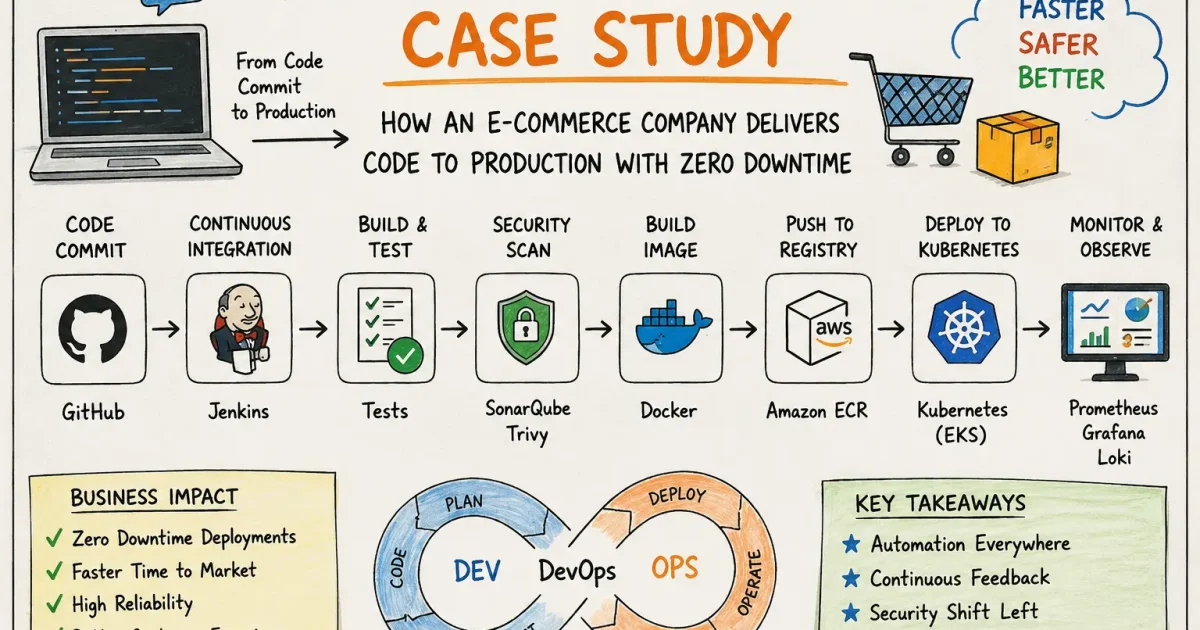
CI Pipeline Stages
- Checkout Code
- Install Dependencies
- Run Linter
- Run Unit Tests
- SonarQube Analysis
- Secret Scan
- Dependency Scan
- Build Application
- Build Docker Image
- Scan Docker Image
- Push to ECR
CD Pipeline Stages
- Deploy to Staging
- Integration Testing
- User Acceptance Testing
- Approval Gate
- Deploy to Production
- Rolling Update
Monitoring Metrics
- CPU Usage
- Memory Usage
- Pod Restarts
- Latency
- Request Rate
- Error Rate
- Disk Usage
- Database Connections
Incident Response
- Alert Triggered
- Engineer Acknowledges
- Investigate Dashboards
- Inspect Logs
- Identify Root Cause
- Rollback
- Verify Recovery
- Conduct Postmortem
Best Practices
- Branch Protection
- Infrastructure as Code
- Immutable Images
- Least Privilege IAM
- Secrets Management
- Health Probes
- Autoscaling
- Regular Backups
- Disaster Recovery Testing
ASCII Architecture
Users → CloudFront → Application Load Balancer → Ingress Controller
→ Kubernetes Cluster (EKS)
→ Frontend Pods
→ Backend Pods
→ Redis
→ PostgreSQL
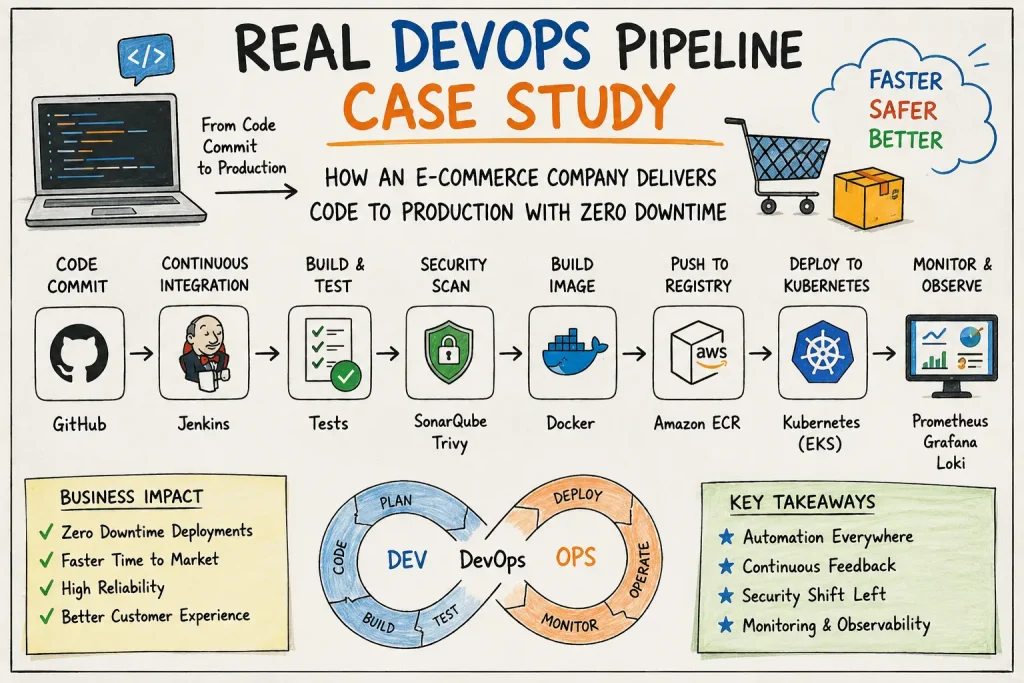
Pipeline Flow
Developer → Feature Branch → Pull Request → Code Review → Merge → GitHub Webhook → Jenkins → Quality & Security → Docker Build → Amazon ECR → Kubernetes Staging → Automated Tests → Production → Monitoring → Rollback (if required)
Root Cause Analysis
- Problem detected by monitoring.
- Logs reviewed in Loki.
- Grafana showed increased error rate.
- Redis serialization incompatibility identified.
- Rollback executed.
- Compatibility tests added.
- Canary deployment introduced.
Key Lessons
- Automate repetitive tasks.
- Never skip testing.
- Security belongs in the pipeline.
- Monitor every deployment.
- Keep rollback simple and tested.
- Perform blameless postmortems.
FAQ
What is CI?
Continuous Integration automatically validates every code change.
What is CD?
Continuous Delivery/Deployment automates software releases.
Why Docker?
Ensures consistent runtime environments.
Why Kubernetes?
Provides orchestration, scaling, and self-healing.
Why SonarQube?
Measures code quality.
Why Trivy?
Finds vulnerabilities before production.
Conclusion
A successful DevOps pipeline combines people, processes, and automation. By integrating source control, CI/CD, containerization, Kubernetes, observability, security, and disciplined rollback strategies, organizations can deploy rapidly while maintaining reliability and customer trust.