
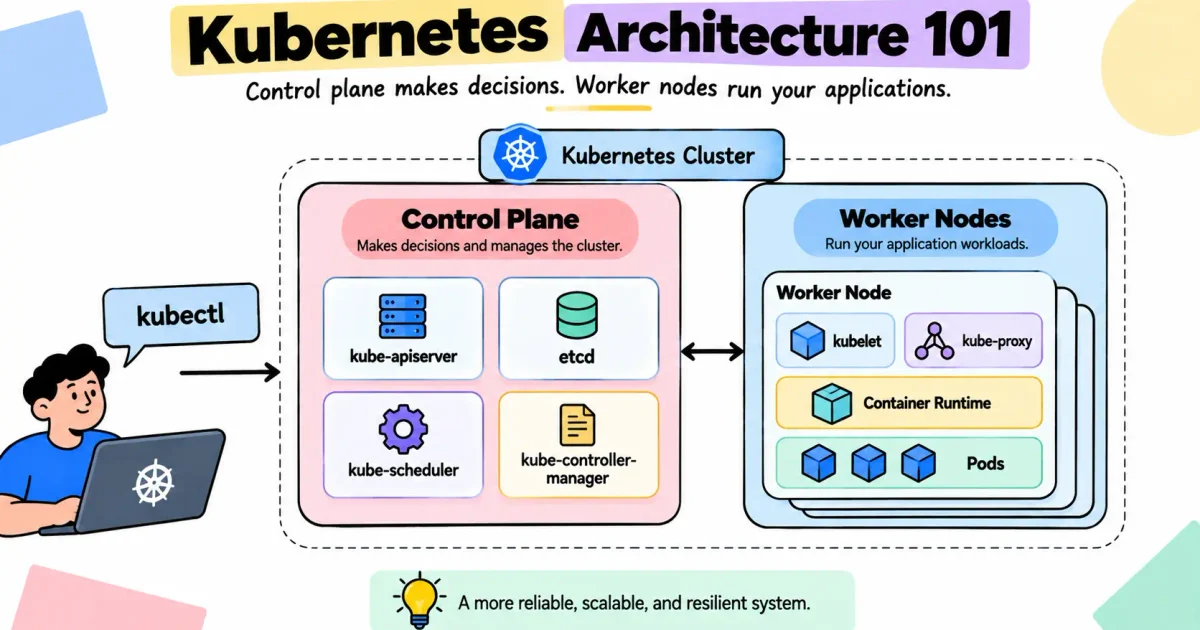
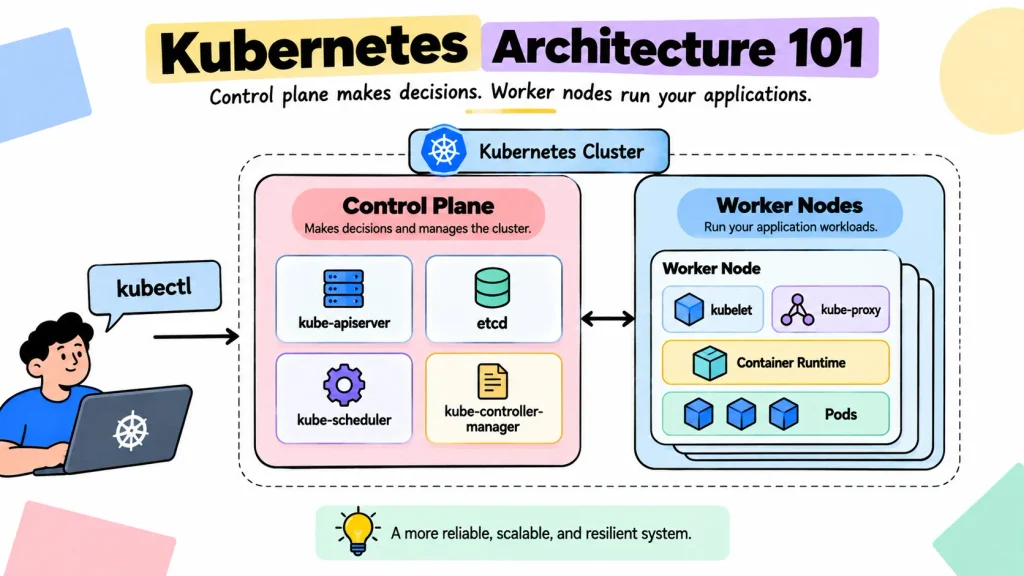
Who makes decisions in Kubernetes, and who actually runs your applications? Understanding this distinction is the foundation of Kubernetes architecture.
Kubernetes separates cluster management from workload execution. The control plane manages the cluster, stores state, schedules workloads, and reconciles the desired state. Worker nodes provide the environment where Pods and application containers run.
The Big Picture: Control Plane vs. Worker Nodes
At a high level, a Kubernetes cluster has two major architectural layers. The control plane makes cluster-level decisions, while worker nodes execute workloads.
CONTROL PLANE
Manages & decides
API Server → etcd → Scheduler → Controllers
WORKER NODES
Executes workloads
kubelet → Runtime → Pods → Applications
The control plane decides what should happen. Worker nodes execute that desired state.
What Does the Kubernetes Control Plane Do?
The control plane is the management layer of Kubernetes. Its components work together to accept API requests, maintain cluster state, decide where workloads should run, and continuously reconcile the cluster with its desired configuration.
kube-apiserver: The Communication Hub
The kube-apiserver is the primary interface for interacting with Kubernetes. Tools such as kubectl and automation systems communicate with the cluster through the API server.
kubectl apply -f deployment.yamlThe API server handles authentication, authorization, validation, and Kubernetes API operations. It also provides the central communication point used by other cluster components.
etcd: The Source of Cluster State
etcd is the distributed key-value store used to persist Kubernetes cluster state. It stores the information Kubernetes needs to understand the configured objects and desired state of the cluster.
Production note: Because etcd contains critical cluster state, production environments require appropriate backup, availability, and data-protection practices.
kube-scheduler: Deciding Where Pods Run
The kube-scheduler selects a suitable node for an unscheduled Pod. It evaluates factors such as available resources, node selectors, affinity and anti-affinity, taints and tolerations, and other scheduling requirements.
Remember: The scheduler chooses the node. It does not start the container.
kube-controller-manager: Maintaining Desired State
Kubernetes continuously compares the desired state with the current state. If a workload should have three Pods but only two are available, controllers work toward restoring the required state.
Desired state: 3 Pods
Current state: 2 Pods
        ↓
Controller detects the difference
        ↓
Workload is reconciled
        ↓
Desired state is restored
This reconciliation model is fundamental to Kubernetes and is used across resources such as Deployments, ReplicaSets, and node-related controllers.
What Happens on a Worker Node?
Worker nodes are the execution layer. They provide the compute environment and node-level components required to run Kubernetes Pods and application containers.
kubelet: The Node-Level Manager
The kubelet runs on a worker node and manages the Pods assigned to that node. It works to keep those Pods running and reports node and workload status back to the control plane.
Container Runtime: Running Containers
The container runtime is responsible for running containers on the node. Kubernetes communicates with the runtime through the Container Runtime Interface (CRI).
Common CRI-compatible runtimes include containerd and CRI-O.
kubelet
   ↓
Container Runtime
   ↓
Container
   ↓
Application
kube-proxy and Service Networking
kube-proxy is traditionally associated with implementing Kubernetes Service traffic rules on nodes. However, it is only one part of Kubernetes networking, and the exact implementation depends on the cluster’s networking solution and configuration.
Pods: Where Applications Run
A Pod is Kubernetes’ smallest deployable unit. Pods run on worker nodes and contain one or more containers that can share networking and selected resources.
Worker Node
│
├── Pod
│   └── Application Container
│
├── Pod
│   └── Application Container
│
└── Pod
    └── Application Container
How Kubernetes Components Work Together
Understanding individual components is useful, but the real value comes from understanding how they work together. Consider a simple Deployment:
apiVersion: apps/v1
kind: Deployment
metadata:
  name: web-app
spec:
  replicas: 2
  selector:
    matchLabels:
      app: web
  template:
    metadata:
      labels:
        app: web
    spec:
      containers:
        - name: web
          image: nginx
kubectl → API Server → Controllers → Scheduler → Worker Node → kubelet → Runtime → Pod
First, kubectl sends the request to the API server. The API server validates and processes it, while the cluster state is persisted in etcd. Controllers manage the required workload objects, and the scheduler selects suitable nodes for unscheduled Pods.
After a Pod is assigned to a node, the kubelet works with the container runtime to start the required containers. The node then reports workload status back to the control plane.
No single component performs the entire operation. Kubernetes works because each component has a defined responsibility within the larger control loop.
Control Plane vs. Worker Node Responsibilities
| Responsibility | Control Plane | Worker Node |
|---|---|---|
| Accept Kubernetes API requests | ✓ | |
| Store cluster state | ✓ | |
| Schedule Pods | ✓ | |
| Reconcile desired state | ✓ | |
| Run application Pods | ✓ | |
| Manage Pods on the node | ✓ | |
| Run containers | ✓ | |
| Support node-level networking | ✓ |
What Happens When a Worker Node Fails?
When a worker node becomes unavailable, Kubernetes detects the changed node condition and works toward restoring the desired workload state. Controllers and the scheduler can participate in recovery when the workload configuration and cluster conditions allow it.
Worker Node Fails
       ↓
Node condition changes
       ↓
Control plane detects the change
       ↓
Controllers work toward desired state
       ↓
Scheduler selects an available node
       ↓
Replacement workload can start
Recovery depends on replica configuration, cluster capacity, storage behavior, scheduling constraints, application architecture, and workload policies. Kubernetes can provide resilience mechanisms, but it cannot compensate for an application with no redundancy or recovery strategy.
What Happens When the Control Plane Has Problems?
Control-plane problems affect the cluster’s ability to perform management operations. Existing workloads may continue running temporarily on worker nodes, but operations such as API requests, scheduling, and reconciliation can be affected.
kubectl get pods
kubectl apply -f deployment.yaml
kubectl scale deployment web-app --replicas=5Primarily affects workloads running on that node.
Primarily affects cluster management, scheduling, and reconciliation.
Production environments commonly use highly available control planes to reduce the impact of control-plane failures.
Common Kubernetes Architecture Mistakes
| Misconception | Reality |
|---|---|
| The scheduler starts containers | The scheduler selects a node; the kubelet and runtime start the workload. |
| The kubelet schedules every Pod | The scheduler makes cluster-level placement decisions. |
| etcd schedules workloads | etcd stores cluster state. |
| The API server runs application containers | The API server processes and exposes cluster operations. |
| kube-proxy is the entire networking layer | kube-proxy is one component involved in Service networking. |
Using the Architecture to Troubleshoot Kubernetes
Architecture becomes especially useful when a workload fails. For example, if a Pod is stuck in Pending, the problem may be related to scheduling rather than the application itself.
kubectl describe pod <pod-name>Investigate node resources, taints and tolerations, affinity rules, scheduling constraints, unavailable nodes, scheduling events, and storage limitations.
Troubleshooting principle: Do not begin by asking which command to run. Begin by asking which component is responsible for the failing decision or operation.
The Kubernetes Architecture Mental Model
What should happen?
        ↓
Control Plane
   ├── API Server
   ├── Controllers
   ├── Scheduler
   └── etcd
        ↓
Where should it run?
        ↓
Worker Node
   ├── kubelet
   ├── Container Runtime
   └── Networking Components
        ↓
Pod
        ↓
Application
Use this model whenever you need to reason about a Kubernetes workload. The control plane manages and decides; the worker node executes.
Conclusion: Why the Separation Matters
Kubernetes becomes much easier to understand when you stop treating its components as isolated tools and start viewing them as parts of one coordinated system.
The API server provides the management interface. etcd stores cluster state. The scheduler decides where unscheduled Pods should run. Controllers continuously reconcile the cluster toward its desired state. On worker nodes, the kubelet manages assigned Pods and the container runtime runs their containers.
CONTROL PLANE DECIDES.
WORKER NODES EXECUTE.
Once this mental model is clear, troubleshooting becomes more systematic. Instead of guessing which command to run, you can identify the architectural layer responsible for the behavior and investigate from there.
Understand the architecture first. The commands become much easier afterward.
Frequently Asked Questions
What is the Kubernetes control plane?
The control plane is the management layer that receives API requests, stores cluster state, schedules workloads, and reconciles the cluster toward its desired state.
What is a worker node in Kubernetes?
A worker node is a machine that provides the compute environment where Kubernetes Pods and application containers run.
Does the Kubernetes scheduler run containers?
No. The scheduler selects a suitable node. The kubelet and container runtime are responsible for running the workload on that node.
Where does Kubernetes store cluster state?
Kubernetes stores persistent cluster state in etcd.
What happens if a worker node fails?
The control plane detects the node condition, and workload controllers may work toward creating replacement instances. The scheduler can place replacement Pods on available nodes when capacity and scheduling constraints allow it.
Can applications continue running if the control plane fails?
Existing workloads may continue running temporarily, but API operations, scheduling, reconciliation, and other management functions can be affected.