
Kubernetes DNS is the hidden backbone that lets your microservices talk to each other reliably, using simple hostnames instead of fragile IPs.
What Is Kubernetes DNS and Why It Matters
Every modern Kubernetes cluster relies on an internal DNS system to resolve service names like payments-service.default.svc.cluster.local into cluster IP addresses. This avoids hardcoding IPs and lets you scale, update, or restart services without breaking connectivity.
Instead of pointing Pods directly to external DNS servers, Kubernetes sets up a cluster-aware DNS (CoreDNS or kube-dns) that understands Kubernetes Services, Endpoints, and namespaces. This DNS server automatically tracks changes in the cluster via the Kubernetes API and then serves fresh records to all Pods.
Key Components in the DNS Flow
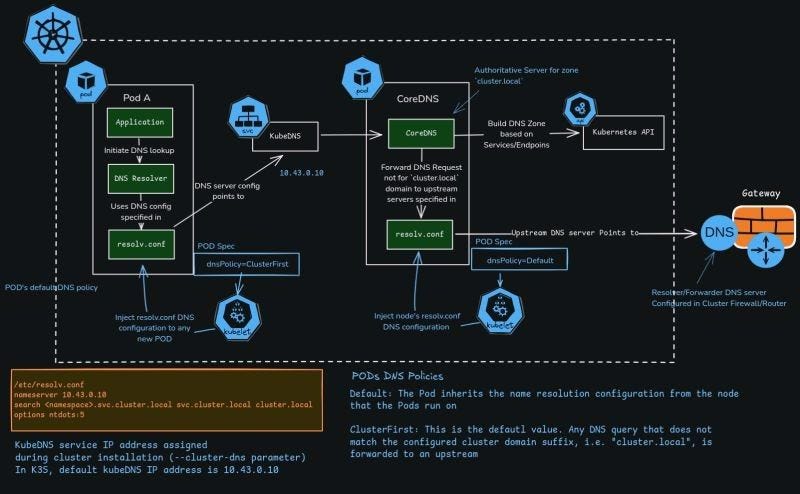
The DNS resolution path inside a Kubernetes cluster goes from the application in a Pod all the way to upstream DNS if required. Here are the main components in that flow.
- Pod (Application + DNS resolver): The application in the Pod performs a lookup via standard system calls like
gethostbyname, which use the Pod’s/etc/resolv.confto decide how to resolve names. - kubelet: When a Pod is created, the kubelet injects DNS-related settings into the Pod, including
dnsPolicyand the/etc/resolv.confcontents. - kube-dns/CoreDNS service: This is the in-cluster DNS server, typically exposed at a stable ClusterIP (for example,
10.x.x.x, depending on your cluster setup). - Kubernetes API server: CoreDNS watches the API to build a DNS zone based on Services and Endpoints for
cluster.localand related domains. - Upstream DNS/Gateway: Any query that CoreDNS cannot answer (for example,
google.com) is forwarded to an upstream DNS resolver configured in the node or cluster firewall/router.
Each of these pieces plays a unique role, but they are tightly connected by the Pod’s DNS configuration and the DNS policies you choose.
Step‑by‑Step: What Happens When a Pod Does a DNS Lookup
When a Pod does a DNS lookup, a detailed sequence of steps occurs behind the scenes. Understanding this flow is crucial for debugging and optimizing service discovery.
- Application triggers DNS resolution
- Your application inside Pod A calls the OS resolver to look up a hostname (for example,
backend.default.svc.cluster.local). - The glibc resolver (or equivalent) reads
/etc/resolv.confto find the DNS server IP and search domains.
- Pod uses its
/etc/resolv.conf
- The Pod’s
/etc/resolv.confis automatically generated by the kubelet based on the node’s DNS config and the Pod’sdnsPolicy.
It typically contains:
nameserver <cluster-dns-ip>– the ClusterIP of kube-dns/CoreDNS.searchdomains such asnamespace.svc.cluster.local svc.cluster.local cluster.localso that short names likebackendare expanded correctly.
- Query goes to kube-dns/CoreDNS
- The Pod’s DNS resolver sends the query to the IP specified by
nameserver. - This request lands on the CoreDNS/kube-dns Pods running in the cluster (often in the
kube-systemnamespace).
- CoreDNS builds zones from the Kubernetes API
- CoreDNS already has an in-memory DNS zone for
cluster.local, built by watching the Kubernetes API for Service and Endpoint objects. - For a Service named
backendin thedefaultnamespace, CoreDNS creates records likebackend.default.svc.cluster.localpointing to the Service ClusterIP.
- CoreDNS answers or forwards the request
- If the requested name is inside the cluster domain (for example, ends with
.cluster.local), CoreDNS resolves it using its Kubernetes plugin and returns the ClusterIP. - If the name does not match the cluster suffix (for example,
example.com), and ifdnsPolicy: ClusterFirstis used, CoreDNS forwards the query to upstream DNS specified in its own configuration.
- Response returns to the application
- The application receives the resolved IP, then opens a TCP or UDP connection to that IP.
- Because the service is fronted by kube-proxy or a service mesh, traffic is load balanced to the appropriate Pod endpoints.
This whole process usually takes only milliseconds but happens for almost every service-to-service call in your cluster.
Understanding /etc/resolv.conf in Pods
The file /etc/resolv.conf is the control center of DNS behavior for a Pod. In Kubernetes, it is not manually created by you; instead, kubelet generates it based on node configuration and Pod DNS settings.
Typical contents look like this:
nameserver 10.43.0.10
search namespace.svc.cluster.local svc.cluster.local cluster.local
options ndots:5
- nameserver: The IP of the kube-dns/CoreDNS service, assigned during cluster installation with parameters like
--cluster-dnsor equivalent flags. - search: A list of search domains so that unqualified hostnames are expanded. For example, querying
backendbecomesbackend.namespace.svc.cluster.localand then other variations. - options ndots: Controls how many dots must appear in a name before it is considered fully qualified; larger values cause more search domain expansions and can affect latency.
When kubelet creates a Pod, it injects this DNS configuration automatically unless you override it with custom DNS settings or change the dnsPolicy.
DNS Policies: ClusterFirst vs Default
Kubernetes gives you control over how Pods inherit DNS settings through the dnsPolicy field in the Pod spec. The most common policies you’ll work with are ClusterFirst and Default.
ClusterFirst(default for normal Pods)- The Pod uses the cluster DNS service (CoreDNS/kube-dns) as its primary resolver.
- Any query not matching the cluster domain suffix (like
.cluster.local) is forwarded to upstream DNS servers configured in CoreDNS. - This is ideal for typical workloads that need both in-cluster and external name resolution.
Default- The Pod inherits the node’s native DNS configuration directly, without automatically pointing to the cluster DNS service.
- It is mostly used for Pods that need to use the node-level DNS behavior as-is, for example some system components or custom networking setups.
By choosing the right dnsPolicy, you decide whether Pods rely mainly on cluster-aware DNS or follow the host node’s DNS stack.
How CoreDNS Uses Upstream DNS Servers
CoreDNS is not only authoritative for Kubernetes Service domains; it also acts as a smart DNS forwarder. This dual role makes it very flexible in mixed internal–external workloads.
Inside the CoreDNS Pod, there is another /etc/resolv.conf that usually contains upstream nameservers, often pulled from the node’s configuration. CoreDNS uses plugins like forward or proxy to send unknown queries to these external resolvers (for example, your organization’s DNS, a firewall-resolver, or internet DNS).
This leads to a clear split of responsibilities:
- Cluster-internal names (like
mydb.default.svc.cluster.local) are answered directly from the Kubernetes plugin and the cluster DNS zone. - Internet names (like
api.paymentgateway.com) are forwarded upstream, respecting your network’s DNS and security policies.
The upstream DNS server might be a gateway or firewall-resolver that sits at the edge of your cluster, exactly where external connectivity is controlled.
KubeDNS/CoreDNS Service IP and Cluster Installation
During cluster installation, a static service IP is assigned to the kube-dns/CoreDNS service via parameters such as --cluster-dns or equivalent settings in your distribution.
For example:
- In many Kubernetes setups, the DNS service IP is chosen from the Service CIDR (for example,
10.96.0.10or10.43.0.10), though the exact address depends on your chosen range. - This IP is stable and never changes, even if the underlying CoreDNS Pods are rescheduled across nodes.
All Pods that use dnsPolicy: ClusterFirst have their /etc/resolv.conf nameserver set to this service IP, ensuring consistent DNS behavior no matter where the Pods run.
Practical Example: Resolving app.default.svc.cluster.local
Consider a microservice app running as a ClusterIP service in the default namespace. Another Pod wants to call it using the DNS name app. Here is what happens step by step.
- The caller Pod’s application opens a connection to hostname
app. - The resolver checks
/etc/resolv.confand expandsappintoapp.default.svc.cluster.localusing thesearchdomains. - The DNS request goes to the
nameserverIP (CoreDNS service) defined in the Pod’sresolv.conf. - CoreDNS looks up the
appService in the Kubernetes API and finds its ClusterIP and associated Endpoints. - CoreDNS returns a DNS response with the ClusterIP to the Pod.
- The Pod connects to that IP, and kube-proxy or the CNI/layer 7 proxy routes it to one of the actual
appPods.
From the developer’s perspective, they only need to know the name app or app.default.svc.cluster.local; the DNS and Service machinery handles everything else.
Tips to Optimize and Troubleshoot Kubernetes DNS
Even though Kubernetes DNS is mostly automatic, cluster operators and SREs often need to tune or debug it. Here are key practices aligned with the architecture described above.
- Right-size CoreDNS/kube-dns
- Scale the CoreDNS Deployment based on queries per second and latency requirements, especially in large clusters with many microservices.
- Use metrics and dashboards to track response times, cache hit ratios, and error rates.
- Tune
ndotsand search domains - High
ndotsvalues can cause extra lookups for external domains, as the resolver tries many cluster suffixes first. - Adjust
ndotsin PoddnsConfigwhen latency to external services becomes an issue, especially in high-throughput APIs. - Separate internal vs external DNS
- Use different DNS policies or multiple DNS views to control which Pods can resolve which domains, improving security and compliance.
- For DNS-heavy workloads, consider caching at the application or sidecar level to reduce load on CoreDNS.
- For multi-region deployments, upstream DNS or traffic managers (like geo-aware load balancers) can route external hostname queries to the nearest region.
- Inside Kubernetes, complement this with topology-aware routing or zone-aware Services to keep traffic close to users.
Combining effective DNS configuration with observability and policy control helps keep service discovery fast, reliable, and secure in any environment.
Follow Neel Shah for more such content around Devops!